Side questiOS appTestFlight beta

PictoChat, if Teenage Engineering made a chat app. Pick a name, hop into a room with whoever's nearby, draw something tiny, hit SEND. Everyone in the room gets it instantly.

It's an iPhone and iPad app I designed and built over the late summer of 2026. Local rooms run over Bluetooth and peer-to-peer Wi-Fi, online rooms go through a five-letter code, and every pixel and every boop is made from scratch.

Role
Design + code
Platform
iPhone + iPad, SwiftUI
Built
Aug–Sep 2026
Status
TestFlight beta
JAKE
PIXEL PIT
CODE

01 / Why

Group chats are built for words. I wanted the other thing: the Nintendo DS PictoChat feeling of scribbling something dumb and passing it to whoever's in the room with you.

Most of my time on Drawl went where I like it: deciding what it should feel like. On the right are the ideas that shaped it, in the order they showed up. It's a pretty honest picture of how I work: start loose, then get pickier every round until it feels like a thing.

The big turn came in the second round. "Fun drawing app" became "if Teenage Engineering made a chat app": warm gray, square corners, one orange, and a canvas that's actually low-res instead of just looking it.

What if PictoChat lived on your phone? Draw something dumb, send it over Bluetooth to whoever's in the room.

It works, but it's polite. It needs personality and a little quirk.

Sound matters. Tiny interface noises while you draw, quirky boops when a message lands. Organic, not overly processed.

Lo-fi and 8-bit. A pixel font for the whole interface. What if Teenage Engineering made a chat app?

The canvas shouldn't be perfect vector. Jagged lines, a real pixel limit. Low-res, not just low-res looking.

Even the rainbow swatch should be pixelated.

Names, and rooms. Whoever makes the room decides who gets in. Bluetooth, local Wi-Fi, or a code over cell.

Swap the orange dot after the logo for a pixel smiley.

Every text box lines up, every panel sits flush. One last design pass, then TestFlight.

It should work on iPad too.

One column on iPad, not two. It's a chat, not a dashboard.

02 / Try it

This is a working Drawl room, ported from the Swift: the same 128×72 grid, the same eight inks and pixel rainbow, the same brush sizes and stair-stepped lines, the same synthesized sounds. Doodle away: your drawings stay on your pad, but somebody might knock.

Tip: tap the copy icon on any frame in the feed to pull it back onto your canvas.

03 / Rooms

Anyone can see a room, but nobody just walks in. You knock, and the host gets a panel: LET IN or NOPE. It works the same whether you're on the same couch or across the country.

Bluetooth + P2P Wi-Fi

The host names a room and it shows up in every lobby nearby, no internet needed. Joiners knock. It's a star: the host's phone relays every drawing and keeps everyone's roster in sync.

MultipeerConnectivity · MCNearbyServiceAdvertiser / Browser

Any network
K7QHM

Five characters from ABCDEFGHJKMNPQRSTUVWXYZ23456789. No I, L, O, 0 or 1, so nobody has to ask "is that a zero?"

For cell data or separate Wi-Fi, the host gets a code and everyone else types it in. Same knock, same approval. A tiny Cloudflare Worker passes the drawings along as opaque envelopes and keeps nothing. When the host leaves, the room is gone.

URLSessionWebSocketTask · Cloudflare Worker · one Durable Object per room

relay/src/index.js · 130 lines
  1. JAKE {"t":"hello","name":"JAKE","host":true}
  2. RELAY {"t":"welcome","host":true}
  3. MOM {"t":"hello","name":"MOM"}
  4. RELAY {"t":"knock","id":"…","name":"MOM"}
  5. JAKE {"t":"approve","id":"…","ok":true}
  6. RELAY {"t":"joined","name":"MOM"}
  7. MOM {"t":"msg","data":"eyJkcmF3aW5nIjp7…"}
  8. RELAY {"t":"closed"}

That's it. The relay never looks inside a drawing. It knows who the host is, who's knocking, and who's in, and it forgets all of it when the socket closes.

Mom knocks. Jake decides. Go on, be the host.

04 / Details

The rule was simple: no gradients, no anti-aliasing, no canned assets. If it's on screen or in your ears, it was built in code.

52 glyphs · 0 font files

Every word in the app is set in this: seven rows of five bits each, drawn as real squares with no font files and no images. Anything it doesn't know turns into a little box. This is the app's actual glyph table.

0 audio files

I wanted sounds that felt organic and not overly processed, so Drawl builds them all at launch: pentatonic boops with a pinch of breath, a rising fwip, a woody tok, and a pencil scratch that gets louder the faster you draw. These pads run the same formulas in your browser.

vector drawl

I didn't want a vector canvas in a retro costume. Strokes are saved as smooth vectors, so copying and rescaling lose nothing, but every screen rasterizes them onto a 128-column grid with Bresenham lines and square brushes. Drag to compare.

The rainbow swatch is diagonal bands of the real inks on an 8×8 grid. The pen steps through 28 hues, one per segment.

Shake your phone and the pad wobbles, thumps and wipes clean. Here, a button will have to do.

copy to canvas

Tap copy on any message and it lands on your canvas, ready for the next panel. Every frame is the same width on the same left edge, so stacked panels read as one tall picture: one person draws the head, the next the body. Making those edges line up exactly was the last thing I fixed before TestFlight.

Turn an iPhone sideways and the same 128 columns stretch across the whole screen: a zoomed-in pixel editor. Pull the FEED tab down to read the chat sideways.

Your tag color is a hash of your name, so you're the same color on every phone in the room and nobody has to sync a thing. (It's also your name in the room up top.)

real captures · iPad (A16) simulator
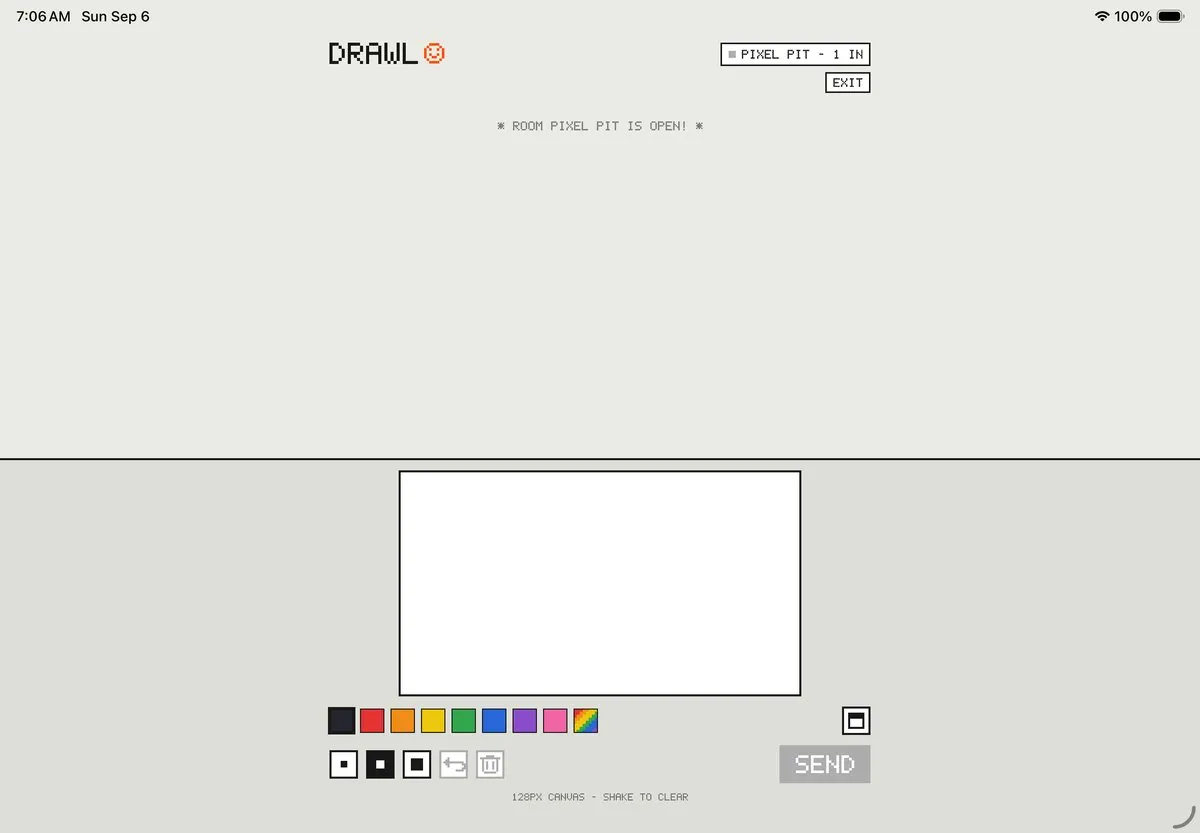
Drawl on an iPad in landscape: the room is a single centred column, feed above and drawing pad below, with warm-gray paper either side.
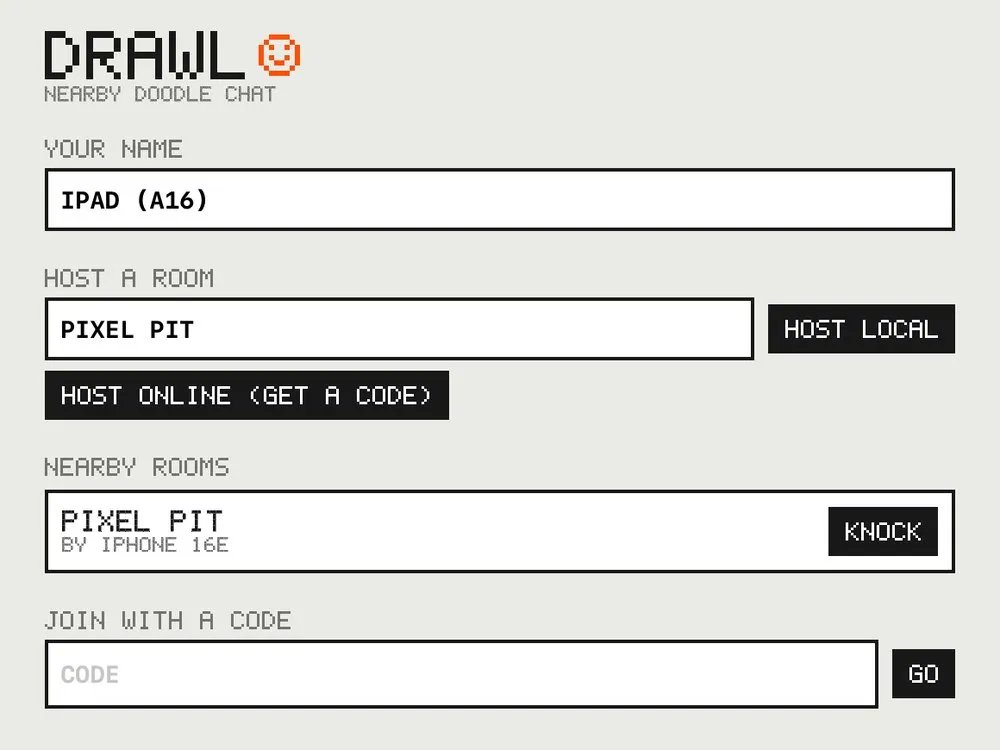
Drawl's lobby on iPad: DRAWL with the orange smiley, your name, host a room, nearby rooms with Pixel Pit by iPhone 16e and a KNOCK button, and join with a code.

The first iPad pass split the feed and the pad into two columns. My exact feedback: "The iPad layout is bad. It shouldn't be multi-column." Now it's the phone's single column, capped at 560 points and centered, so the pixels stay a sane size. These came straight out of the rotation UI test.

05 / Under the hood

Small on purpose. No accounts, no servers that remember anything, no third-party packages.

Interface
SwiftUI. Pixel font, icons and the canvas are all drawn with Canvas, rect by rect
Canvas
128 columns, 16:9. Bresenham lines, square brushes of 1, 2 and 3 px; the eraser sweeps 3, 4 and 5
Inks
8 colors plus a 28-step rainbow pen
Local rooms
MultipeerConnectivity over Bluetooth and peer-to-peer Wi-Fi, host-relayed star
Online rooms
URLSessionWebSocketTask to a Cloudflare Worker, one Durable Object per 5-character code
Sound
AVAudioEngine with buffers synthesized at launch. Ambient category, so it respects the silent switch
Devices
Universal: iPhone and iPad, portrait and landscape. iOS 17+
Project
XcodeGen, plus an XCUITest that hosts a room and rotates the device. No third-party packages in the app
Size
About 2,200 lines of Swift and 130 lines of relay JavaScript
Shipping
TestFlight, build 1.0 (2)
Drawl's app icon: an orange 8 by 8 pixel smiley on warm gray.

06 / Status

Drawl 1.0 is in beta on TestFlight for iPhone and iPad. There's no App Store link yet, so for now it's invite-only (and in the little room up top).

Want an invite? Say hi
Up next · iOS app · in development Roger A push-to-talk walkie-talkie with nothing in the middle.